
Objective:
In this article we will be talking about how Core iQ determines whether to use the account level or customer level contact information for a given customer. We will explore the following topics:
- In what cases Core iQ chooses to use Customer level contact information
- In what cases Core iQ chooses to use Account level contact information
- How to check whether a communication is being sent to Account or Customer level contact information
What does Core iQ use by default?
Customer level information, which is visible at the top of a customer profile, is the default contact information for every customer in Core iQ. In most cases, this information will be used by Core iQ as it is typically the most accurate and should be populated for every customer. Our customers typically populate their information at a customer level and sporadically add in account-specific mailing addresses for business owners or multifaceted accounts. If you have not used account-specific information on any of the accounts within your core, then the Customer level data will always be used.
When does Core iQ use Customer level contact information?
Outside of being the default information for any communication leaving Core iQ, the Customer level data is populated in the following cases:
- Communications originating from a customer level report
- Communications originating from the Send a Marketing Communication button at the top of the customer profile
In both of these cases, Core iQ will populate the information found directly on the customer’s profile page. This means that the email address, phone number, and mailing address that Core iQ uses will all be the ones that are immediately visible for a given customer. Throughout the implementations process, we will ensure that this Customer level data is correctly mapped in for each of your accounts, where applicable.
When does Core iQ use Account level contact information?
If your core data utilizes account-specific information that you want to use when sending an outbound communications, then you can easily do so using Core iQ. The Account level contact information is populated in the following cases:
- Communications originating from automated schedules
- Communications originating from account level reports
- Communications originating from account specific marketing communications within a customer profile
Whenever you use any of the methods outlined above, Core iQ will attempt to populate the email address, phone number, and physical address, along with any merge fields, using the Account level information. In the cases where this data is missing, Core iQ will always gracefully default to the Customer level data. So you never need to worry about Core iQ not populating information because it is missing from a single account within a customer’s record.
How do I send one-off Account level communications?
If you are looking to send a customer an account-specific email or print item, you can do so within the Core iQ customer profile. You will see a small, green letter icon next to each of a customer’s accounts within the Customer Profile area of Core iQ. Each of these icons allows you to queue up an individual communication to that customer that will be directly tied back to their specific product account. So if you want to reach out to directly discuss a customer’s Priority Checking account, you can do so within this area and the communication will be tagged as relating to that account. This information will be appended to their profile’s Onboarding & Other Communications area and will allow you to better track which accounts they have been contact in regards to.
But how do I know for sure which is being used?
If you are really worried about the wrong information being used for a given campaign, or if you forgot which item a campaign was queued up for, there is an easy check you can do. If you find any communication within the Workplan & History area and click into that item to edit it, you will see the following:
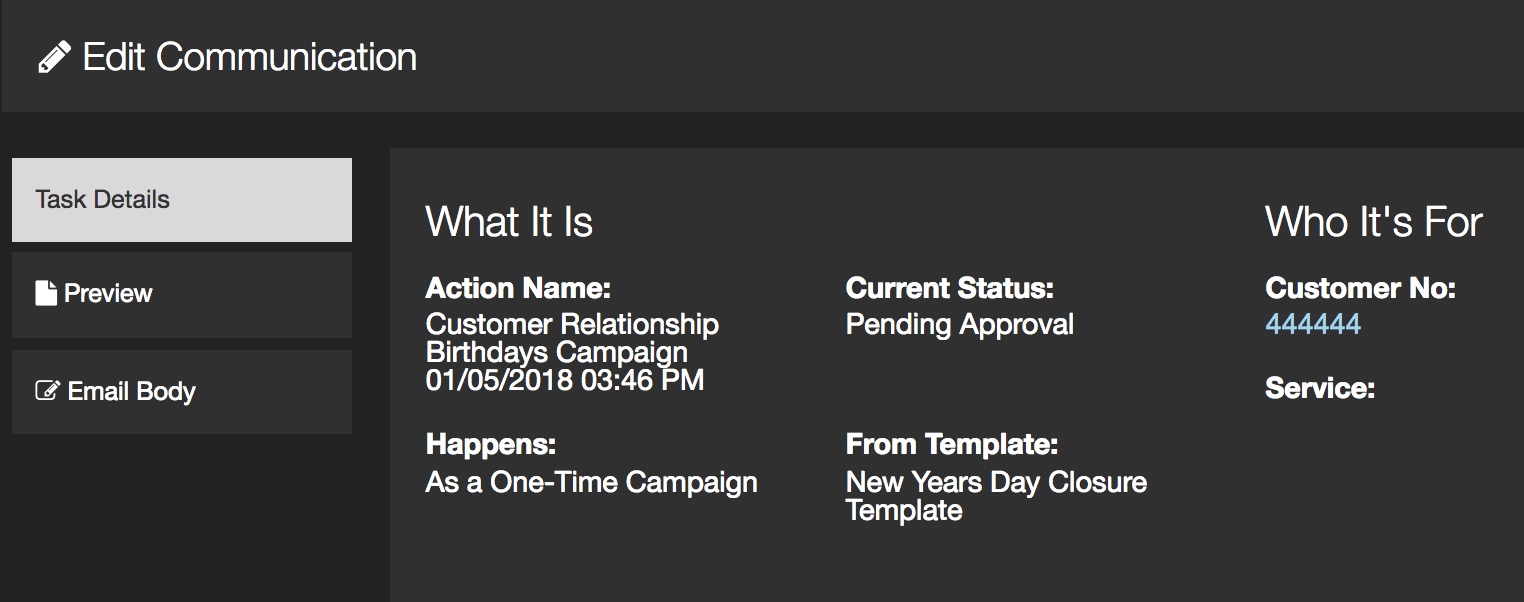
The most important area for you in this case will be the ‘Service:’ section. If this area is blank, like the photo above, then Core iQ will be using the Customer level information for that item. If that area lists any product or service group, then Core iQ will first attempt to populate the items from that Account level contact information. If those items are missing, then it will default back to the Customer level information.